The Zero Reliance Pair
The Zero Reliance Pair connects two Glassy instances you control: the appliance on your desk and a cloud instance on your own VPS. Sync runs directly between them. There is no Glassy server in the data path, nothing for us to see, throttle, or switch off.
It is a one-time capability, $79, perpetual for beta and v1 buyers. It is included with Pro yearly and active Clear; the first 2,000 Clear members keep it permanently.
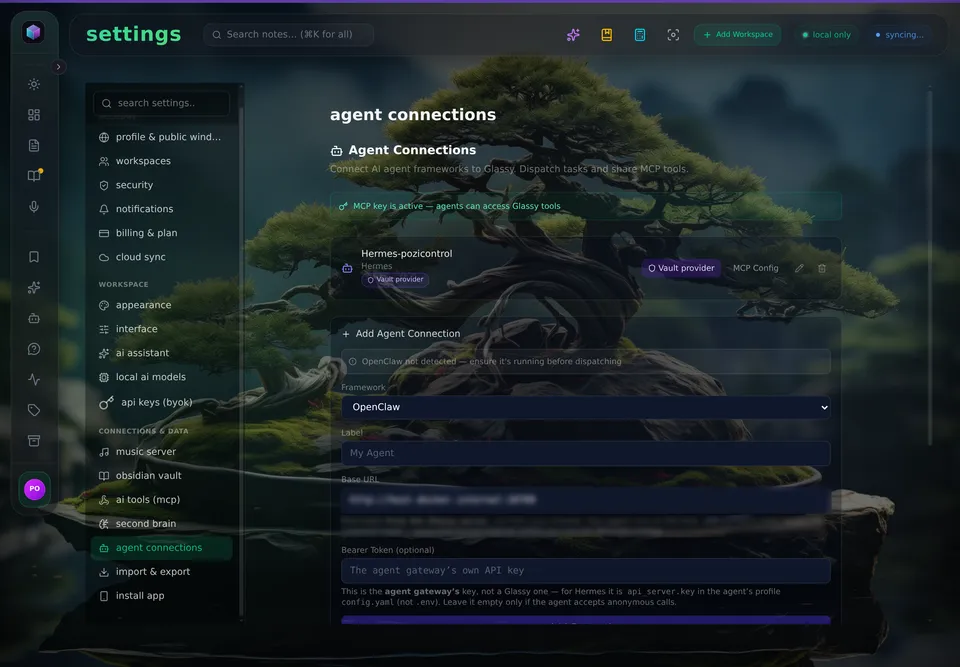
The receiving instance: an agent connection with its MCP key active. The Base URL is redacted in this capture.
What you get
- Direct sync between your home appliance and your own hosted instance.
- No shared tenancy. The receiving instance reads its own seeded owner; the pair authenticates against your instance, not ours.
- The founding terms, disclosed at purchase: perpetual for beta/v1 buyers; future sales may be term-licensed; existing grants are never revoked; support covers product bugs, not your VPS.
- Included with Pro yearly and active Clear. Pro monthly does not include it; a lapsed plan keeps a running pair but cannot configure a new one.
- Founding Clear members keep it permanently. The first 2,000 Clear members (any plan) receive a permanent grant and a member number, whether or not the membership continues.
What you need
- A Glassy account (Free is enough — the Pair is purchasable by any account).
- A Glassy appliance, running and reachable. See Self-Hosting.
- A small VPS (1 vCPU / 1 GB is plenty) with the self-host installer and the HTTPS overlay.
Setup
1. Stand up the second instance
Run the same installer on your VPS, on your own domain, with the HTTPS overlay. It is the same software your appliance already runs. Create its owner account locally.
2. Mint the peer's sync token
On the receiving instance (the VPS), open Settings → Cloud Sync and click Generate for
this instance's sync token. The token is minted by the account that owns that instance. Copy it
once; it is never shown again. It is not the GLASSY_SELFHOST_TOKEN membership anchor — the two
credentials protect different relationships.
3. Point the appliance at it
On the appliance, open Settings → Cloud Sync and fill in:
- Syncs to — the VPS instance's URL.
- Pair token — paste the token from step 2.
Save. The credential is stored encrypted on sync_peers and resolved per cycle, so the change applies
from the next cycle with no restart. GLASSY_SYNC_TOKEN remains the bootstrap/recovery path for a
scripted install; Settings wins when both exist.
Verify in the Cloud Sync panel: getSyncHealth reports credentialSource (settings, env, or
null) so you can see where the credential lives without ever reading its value back.
What it is not
- It is not a service we operate. The runtime pair checks nothing. That absence is the design.
- It does not stop when a membership lapses. A pair already running keeps running, because the runtime never consults us. A lapsed Clear member keeps an existing pair but cannot configure a new one.
- It is not a way around the product's protections. Each instance keeps its own item and batch caps; a cloud receiver keeps its storage and cycle budgets, while a self-hosted receiver has no storage quota or sync-cycle budget. See Sync limits and caps.
Troubleshooting
| Symptom | What it means | Fix |
|---|---|---|
SYNC_RATE_LIMITED with Retry-After |
The receiving peer enforces a cloud cycle budget | Wait for the window. Two self-hosted instances carry no cycle budget; this appears only when a cloud instance is the receiving peer |
SYNC_STORAGE_FULL |
The receiving instance has no headroom | Free space on the receiving side, or raise its quota |
SYNC_ITEM_TOO_LARGE |
One item exceeds 1 MB | Split the item; media is one-directional by design |
SYNC_BATCH_TOO_LARGE |
More than 500 rows in one batch | Let the next cycle carry the rest |
credentialSource: null |
No token resolved | Paste the Pair token in Settings, or set GLASSY_SYNC_TOKEN for a scripted install |
Related
- Self-Hosting — the appliance half
- Cloud Sync — direction, types, conflict policy
- Sync limits and caps — the budgets a pair inherits