Second Brain — AI Knowledge Layer
The corpus is yours; where it runs depends on the instance. On an appliance the Second Brain is fully local: its own index, all 42 MCP tools, named per-agent keys, no call budget. On the hosted cloud the MCP server runs in single-key mode with 37 tools and tier budgets, and the corpus is operator-run — the backfill pane is appliance-only by design.
GET /api/capabilitiesreports which lane you are talking to.
Glassy Second Brain turns your bookmarks, notes, documents, voice transcripts, and Obsidian vault files into a searchable knowledge base that AI agents can query directly. It bridges the gap between your personal knowledge and the AI assistants and agents you use every day.
Updated September 22, 2026 (v2.40.0 — the agent-identity release): the MCP server now exposes 42 tools on the appliance (37 on cloud —
glassy_notifyand the four review tools are appliance-only, because the approval queue that answers them is). The agent is a principal: named per-agent MCP keys pin a verified identity onto the session, so everything an agent does is attributed. New since the graph wave: durable agent memory (glassy_remember/glassy_recall), the owner's awareness lane (glassy_notify, self-host only, ≤10/min per key) with escalating aging-review notifications, first-class session digests (glassy_create_digest), federated search across config-registered corpora (glassy_searchgainscorpora/weights, per-resultcorpusattribution, failures named indegraded), backlink-aware ranking, and the four document tools. Per-source embedding widths are pinned — a mismatched write raisesEMBEDDING_DIMENSION_MISMATCH, a mismatched query answers 409 naming the source.Updated September 9, 2026 (v2.36.0-beta.26+): the vault became a traversable knowledge graph (7 graph tools: backlinks, forward links, N-hop context, path finding, orphans, PageRank centrality, graph stats — served from the indexed corpus, working even when Obsidian is closed) plus live vault access (
glassy_vault_read/glassy_vault_append, concurrency-safe) and the URI-template resources (glassy://vault/{path},glassy://graph/note/{path}). On the appliance there are no tool-call rate limits — deep agentic loops run unthrottled. The Glassy Capture extension (v2.19.0) shows MCP config snippets in Settings → Integrations with the live server URL.Updated September 2, 2026 (v2.36.0-beta.22+): calendar/schedule tools (
glassy_get_schedule, confirm-gated event mutators,glassy_find_free_slots) andglassy_obsidian_proxy.
Search reliability in beta.40
Knowledge Base query responses preserve semantic-lane diagnostics through
hybrid search, including empty results. Check these alongside indexing status:
keyword matches do not mean embeddings are healthy. See
Search diagnostics.
The chunk-size ceiling remains deliberately conservative. A model-context probe protects smaller-context models; larger contexts do not automatically increase chunk size. No measured retrieval-quality gain is claimed for raising the ceiling.
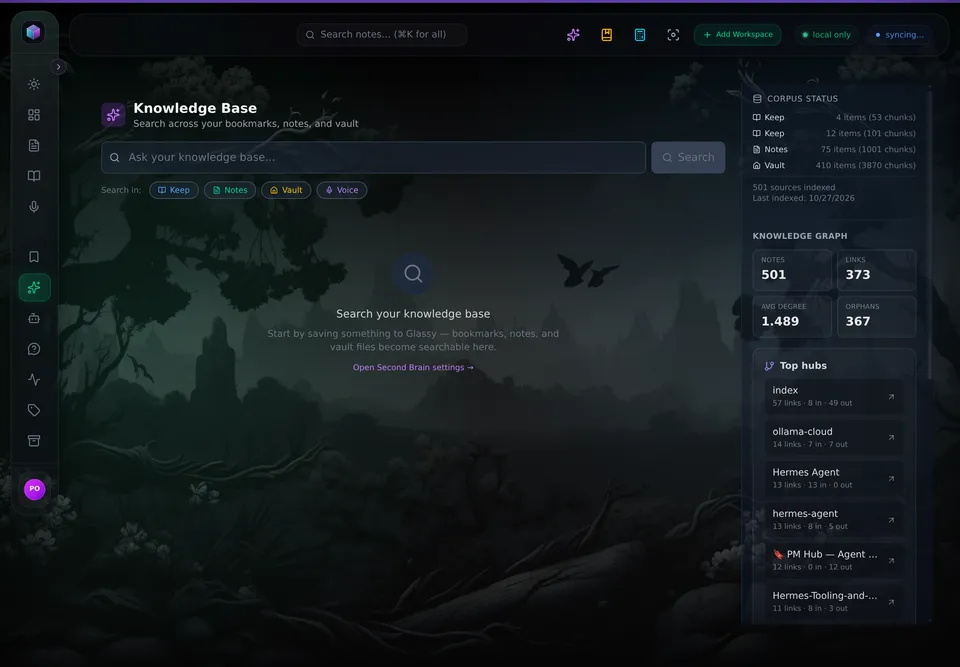
The corpus, the graph counters, and the hubs are all visible.
What It Does
- Indexes everything you save — bookmarks, notes, documents, voice transcripts, and vault files are automatically embedded and searchable.
- Hybrid search — combines BM25 full-text search (keyword matching) with vector semantic search (meaning-based) for the best of both worlds.
- MCP server (real SDK) — exposes your knowledge base to Claude, Cursor, Windsurf, OpenCode, Hermes, Openclaw, Pi, and any MCP-compatible AI tool via the official
@modelcontextprotocol/sdkv2 (McpServer+NodeStreamableHTTPServerTransport+createMcpExpressAppDNS-rebinding protection). - Knowledge Base workspace — a dedicated search UI (
#/kb) in the Glassy dashboard for browsing and discovering your indexed content. - Prompts and resources — four reusable prompt templates (
glassy_summarize,glassy_capture_prompt,glassy_daily_brief,glassy_daily_briefing) and nine registered resources (glassy://kb/search/{query},glassy://recent/{sourceType},glassy://status,glassy://notes/{id},glassy://tags,glassy://folders,glassy://calendar/today,glassy://vault/{path},glassy://graph/note/{path}) — three of these are listed byresources/list(the staticglassy://tags,glassy://folders,glassy://status); the rest are addressable URI templates. - Federated search —
glassy_searchacceptscorporaandweights, tags every result with the corpus it came from, and names a failed corpus indegradedinstead of returning a shorter list. External corpora are appliance-only (SSRF and tenant isolation); internal corpora work on both lanes. - Digests —
glassy_create_digestwrites a session digest as a note: what was done, what was decided, what is still open. Owner-scoped, so it works on both lanes. - Backlink-aware ranking — results can be boosted by how connected a note is, so a hub note outranks an orphan with the same keyword match.
How It Works
flowchart LR
    A[Bookmarks] --> E[Corpus Indexer]
    B[Notes] --> E
    C[Documents] --> E
    D[Vault Files] --> E
    E --> F[content_embeddings]
    E --> G[FTS5 Index]
    F --> H[Semantic Search]
    G --> I[Text Search]
    H --> J[RRF Merge]
    I --> J
    J --> K[KB Query API]
    J --> L[MCP Server SDK]
    K --> M[Dashboard KB UI]
    L --> N[Claude / Cursor / Windsurf]
    L --> O[OpenCode / Hermes / Openclaw / Pi]
    L --> P[Companion MCP Bridge]
P --> Q[window.location.origin + /mcp]- Content is embedded — when you save a bookmark, create a note, or sync a vault file, the corpus indexer generates a vector embedding and stores it in
content_embeddings. - Text is indexed — content is also added to an FTS5 full-text index for BM25 keyword search.
- Queries merge both — when you search, both semantic and text results are combined via Reciprocal Rank Fusion (RRF) for ranked, deduplicated results.
- AI tools connect via the real MCP SDK — Claude, Cursor, Windsurf, OpenCode, Hermes, Openclaw, Pi, and other MCP clients connect to Glassy's
/mcpendpoint and call tools likeglassy_searchto query your knowledge base. The Glassy Capture extension (v2.19.0) shows the livewindow.location.origin + '/mcp'config snippet in Settings → Integrations.
What you can do with it
The engine answers questions. The interesting part is what an agent can carry between sessions. Five things that work today:
| You ask | What happens |
|---|---|
| "What did I save about vector databases, and what did the sources disagree on?" | glassy_search over bookmarks, notes, documents, voice transcripts and vault files, merged by RRF, with citations you can open |
| "What links to this note, and how are these two ideas connected?" | The graph suite: glassy_get_backlinks, glassy_graph_context, glassy_find_paths, glassy_get_orphans, glassy_get_central_notes — served from the indexed corpus, so it works with Obsidian closed |
| "Remember that we chose Postgres because the read pattern was fixed." | glassy_remember writes a real note; glassy_recall returns it next session, scoped to that agent's pinned identity |
| "What is actually free on Thursday afternoon?" | glassy_get_schedule plus glassy_find_free_slots, which inverts the busy map |
| "Draft the summary into the doc, and ask me before you publish it." | The document tools write; glassy_request_review puts the consequence in the owner's queue and the agent polls glassy_get_review |
The four lanes that make this a second brain rather than a search box — memory, canvas,
approval, pairing — are described in plain language on
www.glassy.fyi/second-brain, and the operating contract an
agent follows is GIVE-THIS-TO-YOUR-AI-AGENT.md.
Available MCP Tools
| Tool | Description |
|---|---|
glassy_search |
Hybrid semantic + text search across bookmarks, notes, documents, vault files, and voice transcripts |
glassy_get_recent |
Fetch your most recent bookmarks and notes |
glassy_list_notes |
Paginated note listing with tag, type, color, and cursor filters |
glassy_read_note |
Read a single note by ID — full content, tags, and metadata |
glassy_get_tags |
Unified tag cloud across notes, bookmarks, documents, and voice |
glassy_get_folders |
Bookmark collections and document folders with counts |
glassy_obsidian_query |
Search your Obsidian vault files specifically |
glassy_add_capture |
Save a URL as a bookmark in your GlassyKeep library |
glassy_capture_voice |
Save a voice memo with transcribed text, indexed for semantic search |
glassy_note_create |
Create a new note (text, checklist, or rich) in your Glassy library |
glassy_note_update |
Update an existing note's title, body, tags, or metadata |
glassy_note_delete |
Delete an existing note |
glassy_bookmark_update |
Update an existing bookmark's title, note, tags, or collection |
glassy_bookmark_delete |
Delete an existing bookmark |
glassy_obsidian_proxy (v2.33.0) |
Transparent proxy to your Obsidian Local REST API's /mcp/ endpoint. External AI clients see both Glassy-native and Obsidian-proxied tools through a single MCP surface. SSRF-protected, TLS fallback, Docker host override. |
glassy_get_backlinks |
Vault graph: notes linking TO this note (inbound wikilinks) — served from the indexed corpus, works even when Obsidian is closed |
glassy_get_forward_links |
Vault graph: notes this note links TO, with resolution status |
glassy_graph_context |
The N-hop neighborhood of a note, traversing links AND backlinks |
glassy_find_paths |
All shortest wikilink paths between two notes — how are they connected? |
glassy_get_orphans |
Indexed vault notes with zero connections — capture candidates to integrate |
glassy_get_central_notes |
Hub notes ranked by link degree and PageRank — your MOCs and concept hubs |
glassy_graph_stats |
Graph health: nodes, edges, density, orphans, top hub |
glassy_vault_read |
Read the CURRENT content of a vault note (bridge-first via the Glassy Capture extension, direct fallback) |
glassy_vault_append |
Append markdown to a live note — under a heading (surgical PATCH) or end of file (If-Match concurrency-safe) |
glassy_get_schedule |
Read calendar events for today/this week/an explicit range |
glassy_find_free_slots |
Invert the busy map into free 30-minute blocks within a range |
glassy_create_event / glassy_update_event / glassy_delete_event |
Create (confirm-gated), reschedule, and soft-delete calendar events |
glassy_remember |
Agent memory. Store a durable memory as a real note tagged agent-memory — searchable, graph-linked, and authored by the agent's pinned identity |
glassy_recall |
Recall memories scoped to the calling agent (scope: "mine") or the whole workspace, using the same hybrid search |
glassy_create_digest |
Write a session digest as a note — what the agent did, what it decided, what is still open |
glassy_list_documents / glassy_read_document |
List and read long-form documents (not notes) |
glassy_create_document / glassy_update_document / glassy_delete_document |
Create, edit, and delete documents — the same service the REST lane uses |
glassy_request_review / glassy_get_review / glassy_withdraw_review / glassy_report_review_outcome |
The approval loop. An agent asks, polls for the answer, withdraws, and reports the outcome. Appliance only — the queue that answers them is local |
glassy_notify |
Owner awareness. Rate-limited (≤10/min per key). Appliance only |
MCP Prompts
| Prompt | Description |
|---|---|
glassy_summarize |
Content summarization template (input: URL or content) |
glassy_capture_prompt |
URL capture guidance template (input: URL, optional collection) |
glassy_daily_brief |
End-of-day review template (input: date) |
glassy_daily_briefing |
Morning briefing template (Temporal Spine — input: date) |
MCP Resources
| Resource | Description |
|---|---|
glassy://kb/search/{query} |
Search results as a structured resource |
glassy://recent/{sourceType} |
Recent items filtered by source type |
glassy://status |
Corpus health snapshot |
completable() Argument Hints
The MCP server uses completable() to expose argument autocompletion to LLM clients. Fields with completable hints:
glassy_search.sources— enum (bookmarks, notes, documents, vault, voice)glassy_get_recent.source_type— enum (bookmarks, notes, all)glassy_note_create.type— enum (text, checklist, draw, youtube, music, rss, spotify, vimeo)glassy_note_create.color— free string with palette hints
Tier-Based Rate Limiting (v2.33.0)
Second Brain has two separate rate limiters, each tier-gated by hasActivePaidAccess(req.user):
1. KB Query API (/api/kb/query)
Uses kbTierLimiter middleware in server/routes/kb.js:
| Tier | Limit |
|---|---|
| Free | 30 requests / hour |
| Pro | 300 requests / hour |
Keyed by client IP (express-rate-limit default). Multiple free users behind the same NAT will share the 30/hour limit.
2. MCP Tool Calls (/mcp tools/call)
Uses mcpTierLimiter in server/mcp/index.js. Only tools/call messages are counted — handshake, discovery, notifications, and ping are never throttled:
| Tier | Limit |
|---|---|
| Free | 120 tool calls / hour |
| Pro | 1,200 tool calls / hour |
Keyed per-user via mcpRateLimitKey (falls back to IP only when no user is resolved from the MCP key).
Feature Flags
Second Brain features are gated behind environment flags, and the defaults differ by posture: the hosted cloud mounts the stack (MCP in single-key mode, 37 tools), and the self-host .env.example enables the full stack — every flag below is true except ENABLE_FIRST_PARTY_EMBEDDINGS=false, which makes the user's own key or the on-device model the appliance's embedding lane.
| Flag | What It Gates |
|---|---|
ENABLE_CORPUS_INDEXER |
Embedding generation and storage |
ENABLE_CORPUS_RECONCILER |
The hourly corpus convergence sweep (self-host default true): indexes anything a write path missed — synced rows, older content, silently-failed embeds — in batches of 25 per owner at :15 past each hour. Opt out only with a strict embedding-API budget (ENABLE_CORPUS_RECONCILER=false) |
ENABLE_KB_QUERY |
KB Query API endpoint (/api/kb/query) |
ENABLE_MCP_SERVER |
MCP server on /mcp + MCP key settings UI |
ENABLE_KB_UI |
Knowledge Base workspace (#/kb route) |
ENABLE_HYBRID_SEARCH |
BM25 + vector hybrid search (FTS5) |
ENABLE_MCP_BRIDGE |
Companion MCP token exchange |
ENABLE_OBSIDIAN_MCP_PROXY |
Obsidian MCP proxy through Glassy |
Set them in your .env file:
ENABLE_CORPUS_INDEXER=true
ENABLE_KB_QUERY=true
ENABLE_MCP_SERVER=true
ENABLE_KB_UI=true
ENABLE_HYBRID_SEARCH=true
Getting Started
- Enable the feature flags in your
.envfile. - Run the backfill — index your existing content:
Check progress at
GET /api/kb/backfill-status. On self-host (2.46.0+) this is also automatic: the hourly corpus reconciler (ENABLE_CORPUS_RECONCILER, default on) sweeps anything a write path missed at :15 past each hour, so a converged corpus needs no manual run — the backfill is the immediate path when you do not want to wait for the next pass. - Generate an MCP key — go to Settings → Integrations → MCP Connection and click "Generate MCP Key".
- Configure your AI tool — copy the config snippet for Claude Desktop, Cursor, Windsurf, OpenCode, Hermes, Openclaw, Pi, or any MCP-compatible client from the settings panel.
- Start searching — open the KB workspace at
#/kbin your dashboard, or ask your AI tool to search your knowledge base.
Architecture Notes
- MCP tools call services directly — no HTTP double-hop. Tools import and call
corpusIndexer,aiContextBroker, andDatabasein-process. - JWT-bridging for auth — MCP API keys (
gky_mcp_*) are validated, then a short-lived JWT (5 min) is minted for session tracking. - Dimension safety — every embedding query filters by
dimensions = ?to prevent cosine similarity crashes on dimension mismatch. - Dual-write transition — during rollout, embeddings are written to both the new
content_embeddingstable and the legacybookmark_embeddingstable.