Glassy Capture
The Glassy Capture is a browser extension for Chrome, Firefox, Edge, and Opera that lets you capture web content — bookmarks, articles, screenshots, highlights, and page elements — directly into your Glassy library. It also carries the Obsidian Vault tab — browse your vault, append to your daily note, create notes pushed to the vault, and merge vault + Glassy tags, all from the popup.
Current version: v2.20.1 (released September 27, 2026).
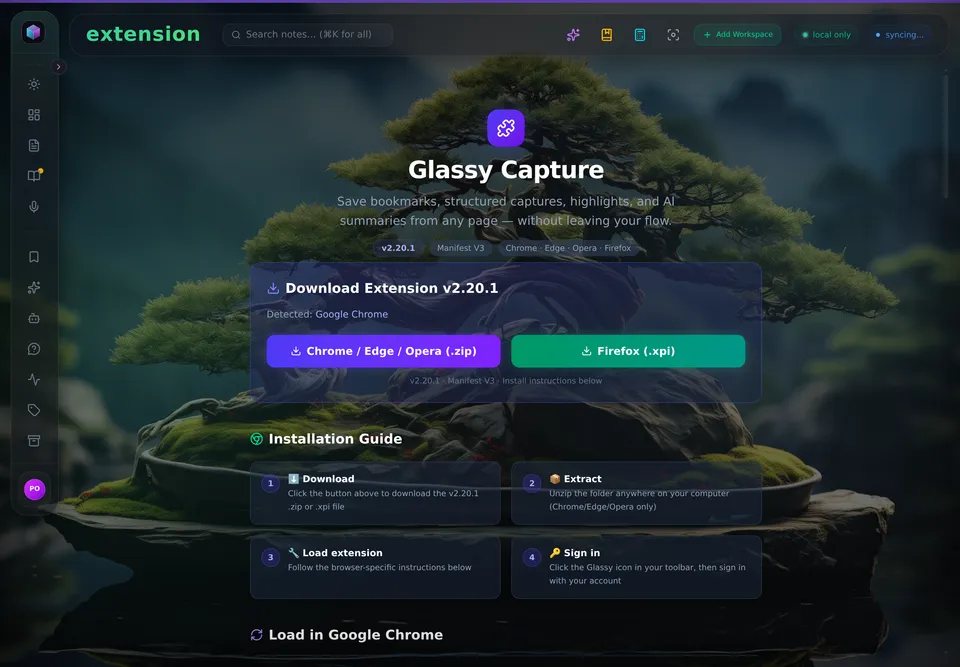
The in-app install page for Glassy Capture.
What you can do with Glassy Capture
- One-keystroke capture — save bookmarks, full-page Markdown, region screenshots, and structured captures without leaving the page you're on.
- Unified Save Card — a single progressive-disclosure form: the essentials (title, collection, tags, note, Save) stay visible; one tap on Smart capture expands content-type presets, visibility toggles, and an inline preview — no screen swap, no duplicated fields.
- Smart Save with type presets — auto-detects content and offers four structured types: Article, Video, Repo, Bookmark. Type chips re-run the page interpreter on change so metadata is always fresh before you save.
- Element picker — hover any page element, click to capture it as rich Markdown with the CSS selector persisted for re-captures.
- Highlights from any page — select text → right-click → Save selection to Glassy. The source URL and a timestamp are captured automatically.
- Offline queue — saves are queued in browser storage and synced when your server comes back. You never lose a capture.
- Multi-account routing — pick which Glassy account a capture is written to, directly in the popup.
- KB search — a dedicated KB 🧠 tab in the popup searches your Glassy knowledge base (bookmarks, notes, vault files) with debounced hybrid search and source filters.
- Obsidian Bridge — when your Glassy server cannot reach Obsidian on
127.0.0.1:27124(WSL2 / Docker Desktop on Windows, or any cloud deployment), the extension proxies Obsidian requests for the server via an authenticated SSE connection and pushes captures directly to your vault as Markdown files with YAML frontmatter. - Vault tab (v2.15.0) — a dedicated Vault tab in the popup: browse your vault folder tree, read notes with rendered markdown plus backlinks and tags metadata, open files in Obsidian, quick-append to today's daily note (Shift+Enter), and compose new notes pushed to the vault as
.mdfiles. - Capture controls (v2.15.0) — an auto-push toggle and a configurable clips folder in Settings → Obsidian Bridge, plus a "Related in your vault" panel on the Save tab that surfaces related vault content when saving a bookmark.
- Tag bridge (v2.15.0) — vault tags merge into the tag autocomplete alongside Glassy tags, with source badges to distinguish them. Nested Obsidian tags (
type/reference) are preserved on persist. - MCP config snippets — Settings → Integrations shows copy-pasteable config snippets for Claude Desktop, Cursor, Windsurf, OpenCode, Hermes, Openclaw, Pi, and any other MCP-compatible client, with the live server URL.
Installation
Pick the install path that matches your browser:
| Browser | Install |
|---|---|
| Chrome / Edge / Opera / Brave / Arc | Download the .zip from the latest GitHub release, extract, and load as an unpacked extension. |
| Firefox 121+ | Install the signed .xpi from the same GitHub release, or open it through about:addons. |
| Inside Glassy | Open app.glassy.fyi/#/extension — the authenticated extension page shows the live download link for your browser. |
Glassy Capture is also available from the in-app #/extension route on a self-hosted instance, where the download links reflect your server URL automatically.
What's new
v2.20.1 — September 27, 2026 — Error classification reads the status code
A small correctness release — no behaviour change beyond more accurate error copy.
- MCP key fetch errors are classified by HTTP status, not by prose. The MCP
settings fetch used to decide "is this an entitlement denial?" by matching words in
the error message (
includes('403'),includes('not enabled'),includes('forbidden')) even though the API client already throws anApiErrorcarrying the authoritative.status. That was wrong in both directions: a server that worded its 403 differently was reported as a network failure (telling the user to check their connection when the real answer was that MCP is disabled), and any error whose text merely contained "403" — a byte count, an ID, an echoed note body — was misread as an entitlement denial. Both branches now key offerr.status === 403.
Full release notes: github.com/0Reliance/glassy-companion/releases/tag/v2.20.1.
v2.20.0 — September 26, 2026 — The manifest is the single source of truth
Pairs with glassy-dash v2.40.5. This release deletes code rather than adding it: the
extension stopped probing the server per-feature and started reading the one document
the server publishes about itself (/api/capabilities).
- MCP settings were unreachable on every server that has ever shipped. v2.19.0's
status check required a
mountedfield thatGET /mcp/statushas never emitted in any server release; that field lives in/api/capabilities. Availability now comes fromcapabilities.mcp.mountedthrough the shared contract. - The Vault tab no longer renders on cloud. It now gates on the same conjunction the
dashboard uses — instance capability (
capabilities.vault.available) and the per-userobsidian_enabledcolumn — so it no longer appears where every call must fail. - The Obsidian Bridge and MCP settings sections are gated the same way, so a cloud user is no longer offered a bridge that cannot reach a plugin.
- A background poll can no longer log you out.
apiFetchnow takes anauthPolicy; background lanes (like the unread-notifications badge) reportSESSION_EXPIREDand leave the session alone, and the popup routes to login on token removal instead of stranding a logged-in shell whose every action fails. - Minting a named key no longer dead-ends. The config snippet now prefers the key you just minted.
- A
#vaultdeep link can no longer strand you on a vault view with no tab to leave by. - Four duplicate bridge-status fetches collapsed into one.
Full release notes: github.com/0Reliance/glassy-companion/releases/tag/v2.20.0.
v2.19.0 — September 22, 2026 — The companion is a principal
Pairs with glassy-dash v2.40.0 (the agent-identity release). The extension now speaks the capability manifest and becomes a verified agent on self-host appliances:
- The client-side capability gate. The extension reads the public
/api/capabilitiesmanifest and fails closed — any error (offline, an older server, a malformed body) resolves to "capability absent", so a cloud or legacy-server user sees exactly the extension they had before. The self-host/cloud split rule now applies to the client too. - Named MCP keys (self-host, named-keys mode). Settings → AI Tools (MCP) can issue this extension its own named agent key (pinned identity "Companion") so everything it saves is attributed — authorship, memory scoping and the owner's activity feed all know it was the browser extension. The key is shown once, never stored.
- The awareness lane in the browser (self-host only). A 🔔 unread agent-notification badge in the popup header — one click opens the dashboard's Agent Review surface. The poller refuses to fetch on cloud.
- KB search shows the lane's health. The 🧠 tab surfaces the server's degraded-lane diagnostics, so a text-only fallback reads as what it is.
Full release notes: github.com/0Reliance/glassy-companion/releases/tag/v2.19.0.
v2.18.1 — September 10, 2026 — Bridge reconnect hardening
Paired with the glassy-dash server-side heartbeat fix (first ping sent immediately, heartbeat interval 20s → 5s) that ships in v2.36.0-beta.28, this closes the ~5-second bridge-SSE subscribe-churn cycle on self-host (0Reliance/glassy#25-F2): the offscreen-document EventSource could drop before the server's first heartbeat arrived, and the extension's onerror handler reconnected only after a 5-second delay.
- Reconnect delay 5000ms → 1000ms — both the initial value and the reset on successful reconnect, so the bridge recovers within a second when a drop still happens.
- Server-side fix ships in glassy-dash v2.36.0-beta.28; companions ≤ v2.18.0 keep the 5-second delay.
Full release notes: github.com/0Reliance/glassy-companion/releases/tag/v2.18.1.
v2.18.0 — August 27, 2026 — Bridge transport v2 (vault writes over the bridge)
Closes the Obsidian glass-pane follow-up with glassy-dash. Until now the SSE bridge could only proxy JSON bodies with no headers — every vault WRITE (tap-to-toggle checkbox, add-under-heading, daily-note append, push-to-vault) fell back to the direct server→Obsidian path and 502'd on containerized self-host where only the bridge can reach Obsidian. Reads worked; writes didn't. That asymmetry is gone:
- Raw markdown bodies + request headers traverse the bridge —
If-Match,Content-Type, andAcceptgo out; the upstreamETagresponse header is relayed back, so conditional writes and conflict detection work end-to-end. obsidianFetchraw-body fix — direct capture-to-vault push no longer corrupts raw markdown bodies (JSON.stringify-quoted + forcedapplication/json).- Transport gated on the advertised version — the server reads
&extv=on the subscribe URL; companions ≤ v2.17.1 keep the proven v1 (JSON bodies, read-only-over-bridge) semantics. - Extension suite 189/189 (5 new
obsidianFetchtests).
Full release notes: github.com/0Reliance/glassy-companion/releases/tag/v2.18.0.
v2.17.1 — August 11, 2026 — Save & sync reliability (release-gate hardening)
The product of a full release-gate code review of the save page, save/sync, and connectivity paths. Three functional fixes plus offline/connectivity hardening:
- Capture-rule pre-population now works — Smart Save auto-fill (preset, collection, tags, public candidate) from your capture rules actually fires again (a response-shape mismatch had silently disabled it).
- Transient server errors no longer log you out — a brief backend outage or deploy blip (5xx) no longer clears your extension session; only a real authentication failure (401) does.
- Offline queue reliability — queued saves that hit an authentication problem now pause and stay queued until you sign back in (previously they could be dropped), and items the server rejects as duplicates/entitlement/gone are removed cleanly instead of retried.
- Popup saves queue offline — saving from the popup while offline or during a server outage now queues the capture (with a Queued for Sync state) instead of losing it; it syncs automatically when the connection returns.
- Settings server-URL validation — an invalid self-host URL now shows an inline error instead of leaving the Save button stuck.
- Host permissions cover all glassy.fyi subdomains (
https://*.glassy.fyi/*). - Hardening: auth/login/ping request timeouts, byte-accurate response size cap, safer storage-quota queue trim, and save-all-tabs stops at the API rate limit.
Server-side companions (glassy-dash): capture screenshots (/uploads/captures/*) can now be previewed by the extension cross-origin (CORP fix), and 4xx API errors return their real message for easier connectivity debugging.
Full release notes: github.com/0Reliance/glassy-companion/releases/tag/v2.17.1.
v2.17.0 — August 7, 2026 — Save-card image preview reliability
The save-card image preview is now reliable across every page. The og:image fills the header with object-fit: cover so non-16:9 images fill the header instead of rendering as a tiny thumbnail, the header background is now the brand gradient fallback (was solid black when og_image failed or was absent), the favicon img is conditional on a non-empty URL with a placeholder glyph fallback (no more broken-image icon on pages without a favicon), and the CSP img-src mirrors connect-src so dev/self-host capture image previews load.
- og:image object-fit: cover — the header image now fills the card header with
object-fit: coverinstead of leaving non-16:9 images as a tiny thumbnail centered on black. - Brand gradient header fallback — when
og_imageis empty or fails to load, the header background is now the brand gradient (was solid black). - Conditional favicon with placeholder glyph — the favicon
imgonly renders when the page has a non-empty favicon URL; otherwise a placeholder glyph is shown, so pages without a favicon no longer display a broken-image icon. - CSP img-src mirrors connect-src — the Content Security Policy
img-srcdirective now mirrorsconnect-src, so capture image previews load on dev and self-host deployments where the server URL differs from the production origin.
Full release notes: github.com/0Reliance/glassy-companion/releases/tag/v2.17.0.
v2.16.0 — July 29, 2026 — MCP Settings UI
The Companion now manages your MCP integration directly from the popup. A new MCP Settings section in the extension lets you configure your MCP token and AI tools without leaving the browser — no more manual JSON editing or round-trips to the dashboard. Alongside the settings UI, the service-worker heartbeat moves onto chrome.alarms for reliability under Chrome's service-worker eviction.
- MCP Settings UI — a new Settings → AI Tools (MCP) panel in the popup: fetch your MCP key, copy a ready-to-paste JSON config snippet for Claude Desktop, Cursor, Windsurf, OpenCode, Hermes, Openclaw, Pi, or any MCP-compatible client, and toggle the integration — all without manual JSON editing. The live server URL is injected automatically.
- chrome.alarms heartbeat reliability fix — the bridge heartbeat monitor now uses
chrome.alarmsinstead ofsetInterval, so the alarm survives Chrome's service-worker eviction and reliably wakes the SW to recreate the offscreen doc after missed heartbeats.
Full release notes: github.com/0Reliance/glassy-companion/releases/tag/v2.16.0.
v2.15.0 — July 27, 2026 — Obsidian Vault Companion
The extension becomes an Obsidian companion, not just a capture tool. A new Vault tab lets you browse your vault, read notes with backlinks and tags, append to your daily note, create new notes, find related vault content when saving a bookmark, and merge vault + Glassy tags in autocomplete. All using existing server endpoints via the bridge — no new server code, no new permissions.
- Vault Browser — new "Vault" tab with breadcrumb folder navigation (folders first, alphabetical), rendered HTML preview (sanitized server-side), metadata chips for backlink count + tags, and an "Open in Obsidian" button.
- Quick Note + Daily Note — a "Notes" sub-tab inside the Vault tab. "Today's Note" card fetches the daily note and offers a quick-append textarea (Shift+Enter). "New Note" composer creates a Glassy note then pushes it to the vault as a
.mdfile (10k char limit). - Capture Controls — auto-push toggle (
autoPushToVault) and configurable clips folder (clipsPath) in Settings → Obsidian Bridge. Default ON to preserve behavior. - "Related in your vault" panel — collapsible, debounced vault search shown on the Save tab when the bridge is connected.
- Tag Bridge — vault tags merged into autocomplete with source badges (
#prefix + "vault" label). Nested Obsidian tags (type/reference) now preserved on persist (was silently destroyed bynormalizeTagstripping/); serversanitizeTagsaligned in both extension and capture routes. - Bridge reliability fix — the SW-side heartbeat monitor moved from
setInterval(which dies when Chrome evicts the service worker) tochrome.alarms(which survives eviction and wakes the SW on fire). The offscreen doc sends a heartbeat every 15s; the 30sBRIDGE_RECONNECT_ALARMrecreates the offscreen doc after 2+ missed heartbeats. Alarm period reduced 2min → 30s for faster recovery.
Full release notes: github.com/0Reliance/glassy-companion/releases/tag/v2.15.0.
v2.14.0 — July 24, 2026 — Obsidian Bridge deep-fix
Three install-blocking bugs fixed, plus the prime WSL2 blocker. The extension would not install on any Chromium browser (chrome://extensions showed "Service worker registration failed. Status code: 15").
- Install failure fixed —
chrome.runtime.onSuspend?.()invoked aChromeEventobject as a function (M.call is not a function); replaced withonSuspend.addListener().manualChunkspinned popup source files, hoisting React into the service worker chunk; replaced with function-form chunking. Dynamic imports injected Vite's preload-helper into the SW chunk (document is not definedin WorkerGlobalScope); converted to static imports. - localhost host permissions broadened — the manifest only declared the Obsidian ports (27123/27124), so the offscreen doc SSE to a localhost self-host Glassy server was silently blocked by Chrome. Now declares
http(s)://127.0.0.1/*andhttp(s)://localhost/*so any localhost Glassy server works. - Offscreen doc existence verified —
ensureOffscreenForBridge()now useschrome.runtime.getContexts()to verify the offscreen doc actually exists before trusting the cached_offscreenReadyflag (Chrome can tear it down under memory pressure). peekToken()prevents silent auth loss —getToken()calledclearAuth()on JWT expiry, silently nuking the token; the offscreen doc can't re-authenticate, so the bridge died silently.peekToken()returns null without clearing; the offscreen doc sendsBRIDGE_AUTH_EXPIREDso the SW shows a re-login notification.- SSE auth migrated to one-time tickets — the offscreen doc fetches a ticket from
POST /api/ext/obsidian-bridge/ticket, falls back to?token=for older servers. The JWT no longer leaks into server access logs, proxy logs, or browser history. - Permission denial feedback —
saveBridgeSettingsreturns{permissionGranted, missingOrigins}; the popup shows a warning banner when localhost host permissions are denied.
Full release notes: github.com/0Reliance/glassy-companion/releases/tag/v2.14.0.
v2.13.0 — July 22, 2026 — Obsidian Bridge MV3 reliability
A critical fix for Chrome MV3 service-worker eviction. Previously, Chrome could kill the service worker after ~30 seconds of inactivity, silently dropping the SSE connection that powers the Obsidian Bridge while the popup still showed "Bridge connected" (stale chrome.storage.local status).
- SSE EventSource moved to a persistent offscreen document — Chrome does not evict offscreen documents, so the bridge stays alive indefinitely while the browser is open. A legacy
connectSSEInServiceWorker()path is retained as a fallback for Firefox versions that lack the offscreen Documents API. chrome.runtime.onSuspendhandler — flips the bridge status toconnected:falsewhen the service worker is evicted, so the UI never shows a stale "connected" indicator.- Test Connection now tests the full bridge loop — both the SSE bridge to the server and the direct extension→Obsidian fetch. A green result confirms both legs; a yellow warning surfaces if the SSE bridge is offline while the direct fetch works.
- Settings sync to server — on SSE
onopen, the extension pushes its Obsidian URL to the server'susers.obsidian_urlcolumn, eliminating drift between the web-app database and extension storage. The Obsidian API token never leaves the extension. - Membership gate removed from popup — the extension no longer does any client-side entitlement gating for
glassy_keep. The server remains the single gatekeeper viarequireKeep. This removes the "Unlock GlassyKeep" upsell wall for self-hosted admins (whoseclear_lifetimetier is resolved server-side). - Softer entitlement toast — a 403 from the server now reads "Save unavailable — Saving from the extension requires a Pro plan. Manage your items in your Glassy workspace." instead of "Upgrade required."
Full release notes: github.com/0Reliance/glassy-companion/releases/tag/v2.13.0.
v2.12.0 — July 8, 2026 — Unified Save Card & Obsidian Bridge
- Unified Save Card — Quick Save and Smart Save are merged into a single progressive-disclosure card. Essentials (title, collection, tags, note, Save) are always visible; one tap on Smart capture expands content-type presets, visibility toggles, and inline preview. No screen swap, no duplicated fields.
- Obsidian Bridge — the extension acts as a local proxy between the Glassy server and Obsidian Local REST API. The server pushes proxy requests to the extension via SSE; the extension calls Obsidian on
127.0.0.1:27124and returns the result. Bypasses WSL2 / Docker Desktop networking entirely. - Push-to-Obsidian — captures saved via the extension can be pushed directly to the vault as Markdown files with YAML frontmatter, with no server round-trip.
- Cloud → self-host switching — changing the server URL in extension settings detects the change, prompts re-authentication, reconnects the Obsidian Bridge SSE, and invalidates caches.
- Optional host permissions — declares
optional_host_permissionsfor127.0.0.1:27123/27124so users can opt into localhost access for the Obsidian Bridge without widening the base permission set. - Firefox
.xpiavailability — signed.xpibuilds are now published on every GitHub Release for Firefox users who prefer manual install.
Full release notes: github.com/0Reliance/glassy-companion/releases/tag/v2.12.0.
How the extension talks to your server
The extension is configured for one Glassy instance at a time. The server URL lives in extension settings — https://app.glassy.fyi for the public instance, https://clear.glassy.fyi for Clear, or your self-hosted URL.
- Authentication — sign in with the same email and password you use in the web app. A JWT token persists in
chrome.storage.localso you stay signed in across browser restarts. - Switching servers — change the URL in Settings. The extension detects the change, prompts you to re-authenticate, reconnects the Obsidian Bridge SSE, and invalidates caches.
- Multi-account — open the popup account picker to choose which account a capture is written to. Captures no longer silently land in the wrong profile.
Capture pipeline (the short version)
Every capture — full page, highlight, element, screenshot — travels through the same reliable pipeline before it lands in your library. See the Capture Pipeline guide for the full walkthrough, including:
- The Chrome offscreen-document / Firefox service-worker routing
- The extractor quality gate (rejects navigation-heavy shells and falls back to a clean bookmark)
- Premium Markdown formatting with metadata header
- Screenshot upload as WebP to
POST /api/ext/capture-image - Offline queue with O(n) flush (v2.5.0+)
When things go wrong
- "Couldn't establish connection" errors — usually a content-script injection failure on the active tab. The extension's
ensureContentScript()fallback retries before failing. - Captures queue but never sync — open Settings → Debug → Offline Queue. Check the server URL, the last error, and the attempt counter.
- Obsidian Bridge shows offline — verify the URL and API token, click Test Connection. If only the SSE bridge is down, toggle the bridge off and on to re-establish it.
- Server returns 403 on save — Companion no longer blocks saves client-side; this is a real server response. See Common Issues for the server-side reasons.
Learn more
- Capture Pipeline — how each capture type is processed
- Offline Behavior — the queue, the flush algorithm, and the O(n) commit
- Obsidian Vault Integration — full Bridge setup, including the WSL2 / Docker Desktop fixes and the Vault Companion feature set
- Companion track on Glassy Learn — video lessons
- Glassy Capture GitHub releases — full version history with
.zipand.xpiassets